Best 60W MOPA Fiber Lasers
60W is where most small businesses land, and there’s a reason for it. It’s enough power to mark and engrave the metals you’ll actually be selling — stainless steel, aluminium, brass, titanium — at a speed that supports paid work rather than hobby projects. It stops short of the price jump into 100W machines built for production floors.
This guide covers what 60W actually gets you, how the main options compare, and the specific circumstances where you’d be better off spending less or more.
What 60W Buys You Over 30W
The jump from 30W to 60W is mostly about time. Both will mark stainless steel cleanly. Both produce colour if they’re MOPA. The difference shows up when you’re running the same job forty times.
A 30W machine engraving a tumbler might take 90 seconds. The same job on 60W might take 45. On one piece that’s irrelevant. On a forty-piece order it’s half an hour of your day, every time that order repeats.
The second difference is depth. Deeper marks on tools, industrial parts and anything that needs to survive wear require either more passes at low power or fewer passes at higher power. 60W does it in fewer passes, which compounds the time advantage.
What 60W does not improve is mark quality. A well-tuned 30W machine and a well-tuned 60W machine produce visually identical results on the same material. Anyone telling you higher wattage looks better is selling you wattage.
60W MOPA Options Compared
| Machine | Source | Approx. price | Warranty | Suits |
|---|---|---|---|---|
| ComMarker B6 MOPA | JPT MOPA | $2,500–$3,000 | Manufacturer standard | First commercial machine, mixed job types |
| Haotian 60W MOPA | JPT MOPA (M7) | $4,000–$4,500 | 3 years on most listings | Daily production, buyers comfortable with settings |
| Cloudray MP-60 NEO | MOPA | $3,000–$4,000 | Varies by seller | Studios prioritising colour range |
Prices move, and bundles change what’s included. Treat these as the shape of the market rather than today’s quote — always confirm current pricing and exactly what ships in the box before you buy.
ComMarker B6 MOPA (60W)
In its favour
- Lowest entry price of the three for a genuine JPT MOPA source
- Full colour capability on stainless
- Bench-sized — fits a home workshop without a dedicated room
- Widely sold, so accessories and community help are easy to find
Against it
- Standard warranty rather than the 3 years Haotian advertises
- Not designed for all-day continuous production
- Costs meaningfully more than a non-MOPA fiber laser
Haotian 60W MOPA (JPT M7)
In its favour
- 3-year warranty on most listings — unusual at this price
- Factory-direct pricing relative to specification
- Higher pulse energy than the baseline M7 specification
Against it
- $1,000–$1,500 more than the B6
- Assumes you already know what you’re adjusting and why
- Overkill if the machine sits idle most of the week
What to Verify Before You Pay
Wattage is the number everyone shops on. It’s rarely the number that determines whether you’re happy with the machine.
- That it’s genuinely MOPA. Look for a stated adjustable pulse width range, typically somewhere around 2–500 nanoseconds. No stated range means it isn’t MOPA, whatever the listing photos show.
- Which laser source is inside. JPT is the common one at this price. A seller who won’t name the source is a seller to skip — that component determines both output and how serviceable the machine is in three years.
- Lens and working area. A bigger field means a less concentrated spot. 110mm × 110mm suits detail work; 175mm or 200mm suits larger flat pieces. Some machines ship with both.
- What’s actually in the box. Rotary attachment, lens options, software licence and shipping are frequently separate line items.
Our full pre-purchase checklist covers all seven checks in detail.
The Costs Beyond the Machine
| Item | Typical cost | Optional? |
|---|---|---|
| Rotary attachment | $200–$600 | No, if you sell tumblers, rings or bottles |
| Fume extraction | $200–$1,000 | No — metal engraving produces fine particulate |
| 1064nm-rated eye protection | $40–$150 | No. Fiber wavelengths are invisible and damaging |
| Enclosure | $300–$1,200 | Strongly recommended |
| Software licence | $0–$600 | Often bundled — confirm before buying |
Budget realistically. A $2,500 machine is a $3,500–$4,000 setup once it’s safe and capable of the work you’re planning to sell.
Who Should Buy Something Else
Go smaller (30W) if your work is jewellery and small detailed parts almost exclusively. You’ll save money and lose very little.
Go bigger (100W) if you’re already turning away work because you can’t produce fast enough, or you need genuinely deep marking on tools and industrial parts. We cover that decision in the 100W guide.
Skip MOPA entirely if everything you sell is black-mark engraving. A standard fiber laser does that identically for meaningfully less — see our fiber laser guide.
Common Questions
Is 60W enough to cut metal?
For practical purposes, no. These are marking and engraving machines. A 60W MOPA will cut very thin sheet slowly and poorly. If cutting is the goal you’re shopping for a different category of machine entirely.
Can a 60W MOPA do colour on all metals?
Colour works best on stainless steel and titanium. Aluminium doesn’t take colour the same way — it anodises or marks dark rather than producing the range you see in stainless colour work. Most colour engraving you’ve seen advertised is stainless.
How long does a fiber laser source last?
Manufacturers typically quote around 100,000 hours for the source. In practice, other components will need attention long before the source does. Treat it as a machine that outlasts the business decision, not a consumable.
Do I need three-phase power?
Not at 60W. These run on standard single-phase household power. Confirm voltage for your country before ordering — a machine wired for the wrong supply is an expensive mistake.
Where to Go Next
- MOPA Laser Engraver Buying Guide — the seven checks before you spend
- ComMarker B6 vs Haotian 60W MOPA — full head-to-head
- 100W MOPA: Is It Worth It? — the next step up
- Best MOPA Laser for a Business — how MOPA differs from standard fiber
- How to Start a Laser Engraving Business
Which laser is right for your work?
Answer three questions. I'll point you at the machine that actually fits.
1. What are you marking most?
2. What matters most?
3. Your budget?
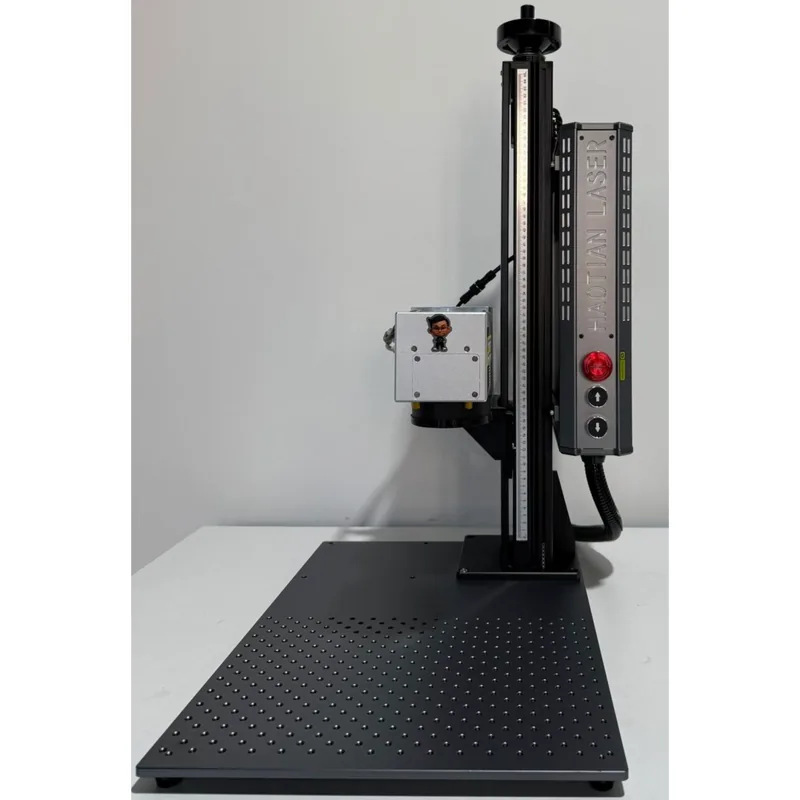
Haotian 50W JPT M8 MOPA Fiber Laser
4.9The 60W JPT M7 source is the colour-marking benchmark. Deepest engraving of the three MOPA picks.
- 60W JPT M7 MOPA source
- Full colour marking on stainless
- 1-500ns adjustable pulse width
- Deep engraving and annealing in one machine